Quick answer: An effective dental clinic website makes it easy for patients to understand your services, trust your practice, and request an appointment. The essentials are fast mobile pages, clear treatment information, visible contact details, accessible navigation, authentic proof of care, and a booking process that fits the clinic's actual schedule.
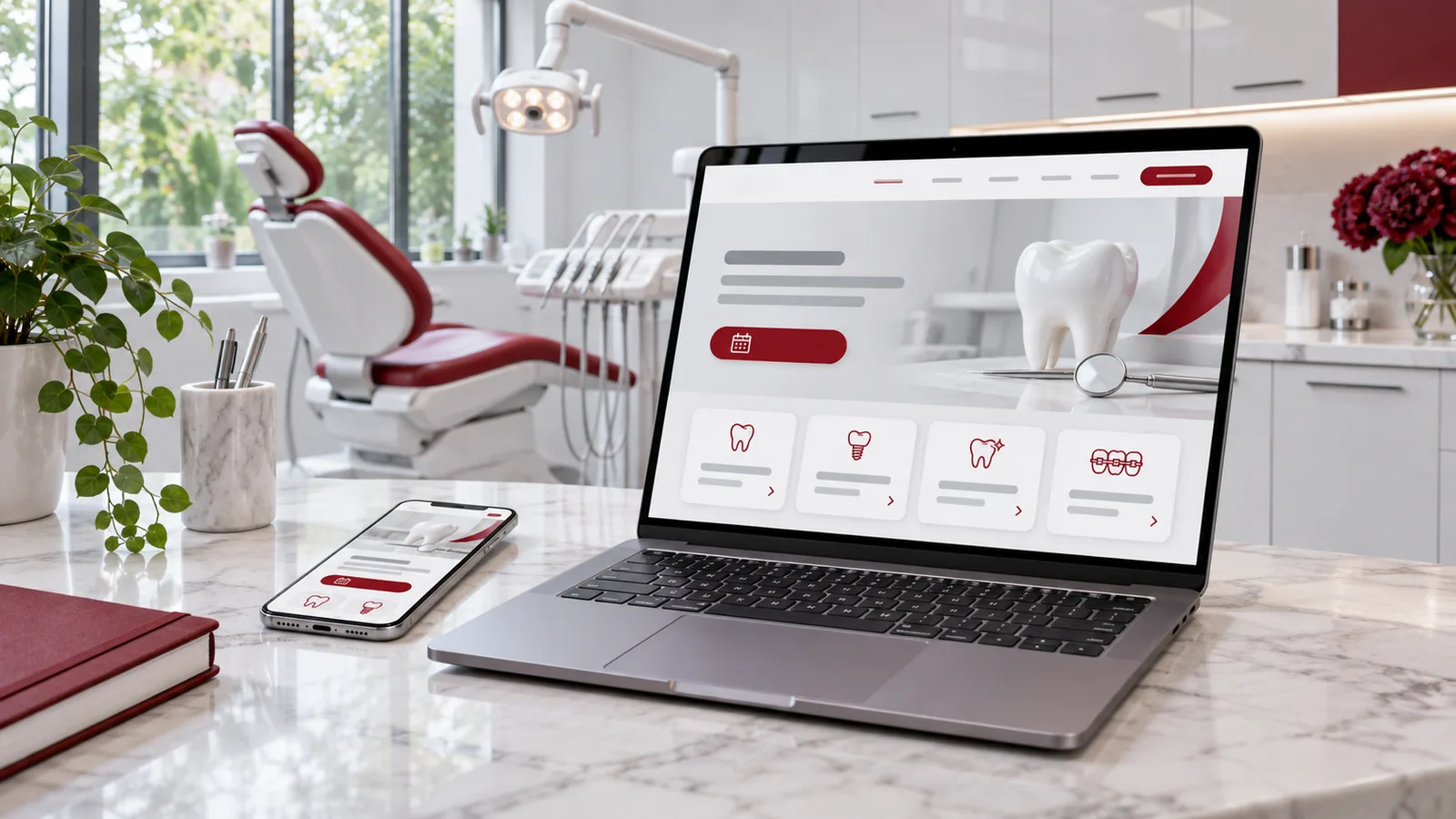
A custom dental website should work equally well on a laptop and a phone—and always make the next step obvious.
Patients often arrive with a specific question: “Do you offer emergency dentistry?”, “How much might a crown cost?”, or “Can I book a cleaning next week?” A beautiful homepage helps, but it cannot answer those questions on its own. Your dental website needs a useful path from the patient's concern to the appropriate next action.
What makes a dental website different from a generic business website?
Dental patients are making decisions about health, comfort, time, and money. They may be anxious, visiting for the first time, or searching urgently from their phone. A generic brochure template rarely explains the details that matter: the services offered, who provides care, where the office is located, what happens at the first visit, whether an appointment is available, and how billing works.
A custom dental website can organize those answers around your practice—not force your practice into a template. Customization should serve clarity, however; an unusual animation is less valuable than a readable emergency dentistry page with a working call button.
The 12-point dental website design checklist
1. Make the homepage answer three questions immediately
Above the fold, visitors should understand what kind of dental practice you are, where you serve patients, and how to contact or book with you. A useful example is: “Family and Cosmetic Dentistry in Austin, TX” followed by “Request an appointment” and a visible phone number. Use your real city, name, and services; do not borrow another clinic's wording.
2. Prioritize mobile speed and readable layouts
Use properly sized WebP or AVIF images, avoid heavy auto-playing videos, reserve space for media to reduce layout shifts, and test mobile pages on an average connection. Buttons should be easy to tap and text should remain legible without zooming. Check performance on actual treatment and booking pages—not only the homepage.
3. Give every major treatment its own useful page
Patients searching for dental implants, clear aligners, cleanings, crowns, or emergency care have different questions. Create service pages that explain who the treatment may suit, what a visit typically involves, what can change the plan, and how to ask for an evaluation. Treatment claims and medical explanations should be reviewed by a qualified dental professional before publication.
4. Use genuine photos and accurate staff information
Show the real office, providers, and environment where you have permission. Include clinicians' names and credentials accurately. Patients should not have to guess whether the practice shown in a photo is the one they will visit. Stock or AI images may support a conceptual article, but they should not be presented as photographs of your actual clinic.
5. Keep appointment actions clear on every page
Offer a consistent “Request an appointment” button, a click-to-call option, and clear office hours. Label a request form honestly: an appointment request is not a confirmed booking unless your scheduling system has actually reserved the slot.
6. Explain cost and financing without invented prices
Where possible, describe accepted payment methods, insurance participation, financing options, and whether estimates follow an exam. Avoid promising exact treatment costs or insurance benefits before the clinic can confirm them.
7. Address new-patient questions
Create a “Your First Visit” page with arrival instructions, forms, parking or transit details, what to bring, and the practice's approach to dental anxiety. This reduces uncertainty before someone contacts the office.
8. Make contact and location details consistent
Display the official practice name, address, phone number, hours, and directions. Keep these details in sync with your Google Business Profile, directory listings, and any location-specific pages.
9. Build accessibility into the design
Use sufficient color contrast, meaningful headings, labeled form controls, keyboard navigation, visible focus indicators, and descriptive image alt text. An accessible site is easier to use for many patients, including people using assistive technology.
10. Treat privacy as a design requirement
Use HTTPS, collect only information needed for the request, explain how submitted information is handled, and assess any third-party form, chat, analytics, or scheduling tools. A secure connection alone does not establish HIPAA compliance. If your clinic is a HIPAA-covered entity and a vendor handles protected health information on your behalf, legal and security review—including a business associate agreement when required—is essential.
11. Show reliable trust signals
Explain qualifications, affiliations, practice policies, and the experience patients can expect. Display testimonials only with proper permission; do not invent review counts, awards, or patient outcomes. Be thoughtful about before-and-after photos and their consent requirements.
12. Measure what matters after launch
Track page visibility, appointment-request completions, calls where appropriately configured, and form errors. Watch where people abandon the booking flow. Evaluate privacy implications before adding analytics scripts, especially on pages or events involving health information.
How the website turns a search into a request
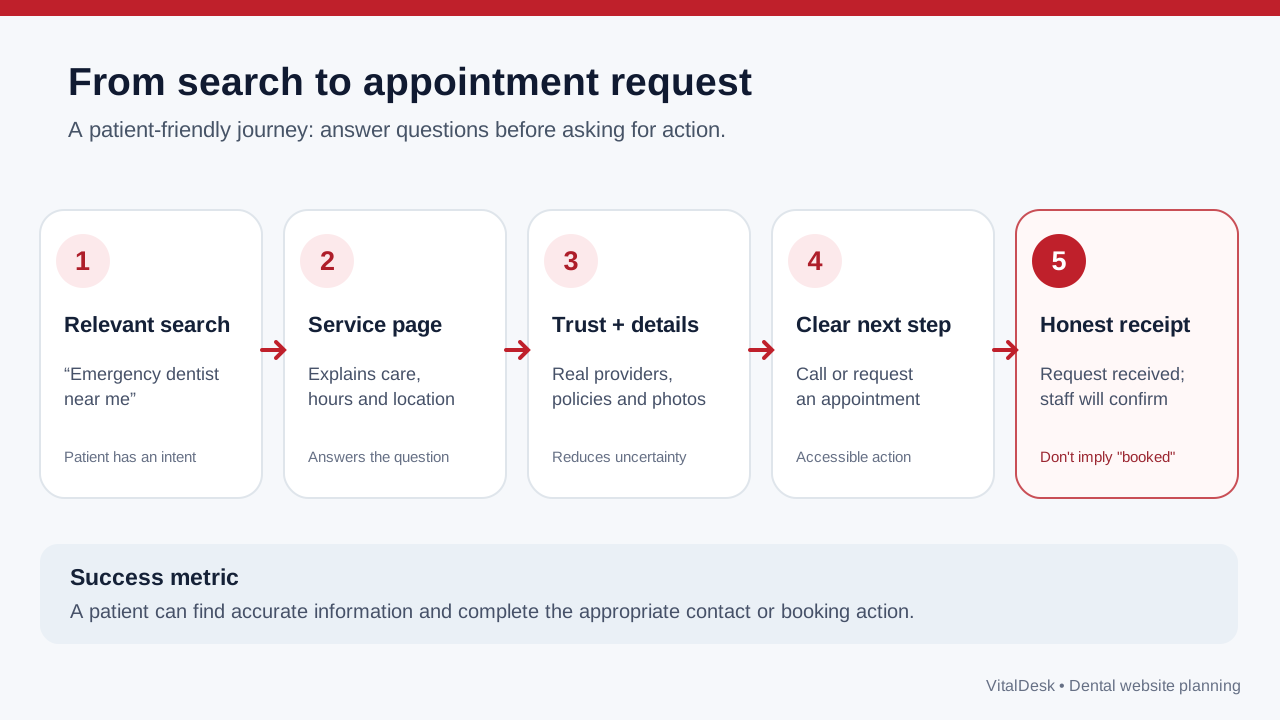
Patient journey: each step removes a specific question or obstacle before an appointment request is submitted.
For example, a new patient searching “emergency dentist near me” may land directly on your emergency care page—not your homepage. That page should explain which problems warrant a call, display actual operating hours, give the phone number prominently, and clarify how urgent visits are handled. The next step should match your workflow, including instructions for emergencies when the office is closed.
Should a dental clinic use a template or a customized website?
A template can be sufficient for a new practice with a small budget and simple needs. A customized site becomes more valuable when you need multiple service lines, location-specific content, distinct branding, accessible custom forms, or booking linked to office operations. The right choice is the one your team can maintain accurately.
When comparing proposals, ask who owns the domain, how the website can be exported, who updates clinical content, how hosting and backups work, and what happens if the scheduling vendor changes. For a deeper look at scheduling, read our guide to dental booking integrations.
Common questions about dental website design
What pages should every dental practice website have?
Start with Home, About/Team, Services, New Patients, Contact/Location, and Request an Appointment. Add individual pages for major treatments and a clear privacy notice. An FAQ or educational resource section can answer patient questions that do not fit elsewhere.
Does a custom design automatically improve Google rankings?
No. Better structure, speed, useful content, and crawlable pages support search visibility, but rankings depend on many factors. A custom visual design is not itself a ranking guarantee. Read our dental local SEO guide.
Do patients need to create an account to book?
Not always. For many clinics, a short, accessible request flow works well. Account requirements should depend on the scheduling and privacy needs of the practice, not be added simply because a vendor supports them.
How often should treatment information be updated?
Review pages when services, clinicians, insurance policies, pricing guidance, or hours change. Clinical content should also have a named review owner and review cadence appropriate to its risk and complexity.
Build a dental website around your patient journey
VitalDesk offers customized clinic website services designed to bring together patient-friendly treatment pages, search visibility, and practical appointment pathways. The exact booking, payment, and practice-management integrations should be verified for your clinic's software and workflow.
Next step: Explore VitalDesk's customized clinic website service and ask for a plan based on your location, treatments, and preferred booking process.
Editorial references: Google Search Essentials; Google image SEO guidance; HHS guidance on online tracking technologies.
Plan your custom dental website
Discuss the practice services, patient questions, booking workflow and location details that your website needs to communicate.
Explore custom websites